
Supported Camera List
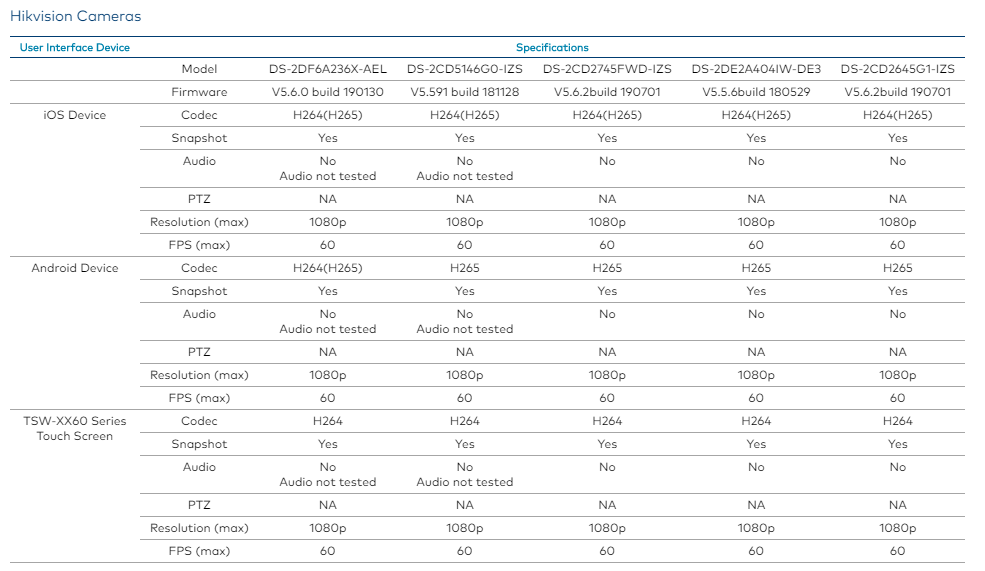
Models have tested and certified by Crestron
- DS-2CD2743G1-IZS - 4 MP Outdoor IR Varifocal Dome Camera
- DS-2CD2E20F-W - Recessed Mount Dome IP camera 2MP, 2.8 mm (106°) fixed lens, Wi-Fi Communication
- DS-2CD5146G0-IZS - 4MP DarkFighter Indoor Moto Varifocal Dome Network Camera
- DS-2DE2204IW-DE3 - 2 MP Indoor 4x Network IR PTZ Camera
- DS-2DF6A236X-AEL - 6 in. 2 MP 36X DarkFighter Network Speed Dome
- DS-2CD2745FWD-IZS - 4 MP Powered-by-DarkFighter Varifocal Dome Network Camera
- DS-2DE2A404IW-DE3 - 2-inch 4 MP 4X Powered by DarkFighter IR Network Speed Dome
- DS-2CD2645G1-IZS - 4 MP Powered-by-DarkFighter Varifocal Bullet Network Camera
Models that use the same firmware as the tested camera models are also compatible
- IPC R2 Platform Cameras: DS‑2CD2E20F‑W, DS‑2CD2010‑I, DS‑2CD2010F‑I(W), DS‑2CD2020‑I, DS‑2CD2020F‑I(W), DS‑2CD2110F‑I(W)(S), DS‑2CD2120F‑I(W)(S), DS‑2CD2410F‑I(W), DS‑2CD2420F‑I(W), DS‑2CD2510F, DS‑2CD2520F, DS‑2CD2610F‑I(S), DS‑2CD2620F‑I(S), DS‑2CD2710F‑I(S), DS‑2CD2720F‑I(S), DS‑2CD2610F‑IZ(S), DS‑2CD2620F‑IZ(S), DS‑2CD2710F‑IZ(S), DS‑2CD2720F‑IZ(S), DS‑2CD2T10‑I3/I5/I8, DS‑2CD2T20‑I3/I5/I8, DS‑2CD2E10F, DS‑2CD2E20F, DS‑2CD2Q10FD‑IW, DS‑2CD2D14WD, DS‑2CD2C10F‑IW, DS‑2CD6510‑I(O), DS‑2CD6510D‑I(O), DS‑2CD6510DT‑I(O), DS‑2CD6520‑I(O), DS‑2CD6520D‑I(O), DS‑2CD6520DT‑I(O), DS‑2CD6510ET‑I(0), DS‑2CD6520ET‑I(0)
- IPC G1 Platform Cameras: DS‑2CD2743G1‑IZS, DS‑2CD2025FWD‑I, DS‑2CD2025FHWD‑I, DS‑2CD2035FWD‑I, DS‑2CD2045FWD‑I, DS‑2CD2055FWD‑I, DS‑2CD2085FWD‑I, DS‑2CD2125FWD‑I(S), DS‑2CD2125FHWD‑I(S), DS‑2CD2125G0‑IMS, DS‑2CD2135FWD‑I(S), DS‑2CD2145FWD‑I(S), DS‑2CD2155FWD‑I(S), DS‑2CD2165G0‑I(S), DS‑2CD2185FWD‑I, DS‑2CD2185G0‑IMS, DS‑2CD2325FWD‑I, DS‑2CD2325FHWD‑I, DS‑2CD2335FWD‑I, DS‑2CD2345FWD‑I, DS‑2CD2355FWD‑I, DS‑2CD2385FWD‑I, DS‑2CD2425FWD‑I(W)(S), DS‑2CD2435FWD‑I(W)(S), DS‑2CD2455FWD‑I(W)(S), DS‑2CD2525FWD‑I(W)(S), DS‑2CD2525FHWD‑I(W)(S), DS‑2CD2535FWD‑I(W)(S), DS‑2CD2545FWD‑I(W)(S), DS‑2CD2555FWD‑I(W)(S), DS‑2CD2T25FWD‑I5/I8, DS‑2CD2T25FHWD‑I5/I8, DS‑2CD2T35FWD‑I5/I8, DS‑2CD2T45FWD‑I5/I8, DS‑2CD2T55FWD‑I5/I8, DS‑2CD2T85FWD‑I5/I8, DS‑2CD2625FWD‑IZS, DS‑2CD2625FHWD‑IZS, DS‑2CD2635FWD‑IZS, DS‑2CD2645FWD‑IZS, DS‑2CD2655FWD‑IZS, DS‑2CD2665G0‑IZS, DS‑2CD2685FWD‑IZS, DS‑2CD2685G0‑IZS, DS‑2CD2725FWD‑IZS, DS‑2CD2725FHWD‑IZS, DS‑2CD2735FWD‑IZS, DS‑2CD2745FWD‑IZS, DS‑2CD2755FWD‑IZS, DS‑2CD2765G0‑IZS, DS‑2CD2785FWD‑IZS, DS‑2CD2785G0‑IZS, DS‑2CD2H25FWD‑IZS, DS‑2CD2H25FHWD‑IZS, DS‑2CD2H35FWD‑IZS, DS‑2CD2H45FWD‑IZS, DS‑2CD2H55FWD‑IZS, DS‑2CD2H85FWD‑IZS, DS‑2CD2023G0‑I, DS‑2CD2043G0‑I, DS‑2CD2063G0‑I, DS‑2CD2083G0‑I, DS‑2CD2123G0‑I(S), DS‑2CD2143G0‑I(S), DS‑2CD2163G0‑I(S), DS‑2CD2183G0‑I(S), DS‑2CD2323G0‑I(U), DS‑2CD2343G0‑I(U), DS‑2CD2363G0‑I(U), DS‑2CD2383G0‑I(U), DS‑2CD2T23G0‑I5/I8, DS‑2CD2T43G0‑I5/I8, DS‑2CD2T63G0‑I5/I8, DS‑2CD2T83G0‑I5/I8, DS‑2CD2423G0‑I(W), DS‑2CD2443G0‑I(W), DS‑2CD2463G0‑I(W), DS‑2CD2523G0‑I(W)(S), DS‑2CD2543G0‑I(W)(S), DS‑2CD2563G0‑I(W)(S), DS‑2CD2623G0‑IZS, DS‑2CD2643G0‑IZS, DS‑2CD2663G0‑IZS, DS‑2CD2683G0‑IZS, DS‑2CD2723G0‑IZS, DS‑2CD2743G0‑IZS, DS‑2CD2763G0‑IZS, DS‑2CD2783G0‑IZS, DS‑2CD2H23G0‑IZS, DS‑2CD2H43G0‑IZS, DS‑2CD2H63G0‑IZS, DS‑2CD2H83G0‑IZS, DS‑2CD2623G1‑IZ(S), DS‑2CD2643G1‑IZ(S), DS‑2CD2663G1‑IZ(S), DS‑2CD2683G1‑IZ(S), DS‑2CD2065G1‑I, DS‑2CD2085G1‑I, DS‑2CD2645G1‑IZ(S), DS‑2CD2665G1‑IZ(S), DS‑2CD2685G1‑IZ(S), DS‑2CD2723G1‑IZ(S), DS‑2CD2725G1‑IZ(S), DS‑2CD2743G1‑IZ(S), DS‑2CD2745G1‑IZ(S), DS‑2CD2763G1‑IZ(S), DS‑2CD2765G1‑IZ(S), DS‑2CD2783G1‑IZ(S), DS‑2CD2785G1‑IZ(S), DS‑2CD2T65G1‑I5'8, DS‑2CD2T85G1‑I5'8, DS‑2CD2T27G1‑L, DS‑2CD2T47G1‑L, DS‑2CD2327G1‑L(U), DS‑2CD2347G1‑L(U), DS‑2CD2123G0‑IU, DS‑2CD2143G0‑IU, DS‑2CD2163G0‑IU, DS‑2CD2183G0‑IU, DS‑2CD3025G0‑I(B), DS‑2CD3045G0‑I(B), DS‑2CD3085G0‑I(B), DS‑2CD3023G0‑I, DS‑2CD3043G0‑I, DS‑2CD3063G0‑I, DS‑2CD3125G0‑IS, DS‑2CD3125G0‑IMS, DS‑2CD3145G0‑IS, DS‑2CD3185G0‑IS, DS‑2CD3185G0‑IMS, DS‑2CD3123G0‑I(S), DS‑2CD3143G0‑I(S), DS‑2CD3163G0‑I(S), DS‑2CD3325G0‑I(B), DS‑2CD3345G0‑I(B), DS‑2CD3385G0‑I(B), DS‑2CD3323G0‑I, DS‑2CD3343G0‑I, DS‑2CD3363G0‑I, DS‑2CD3525G0‑IS, DS‑2CD3545G0‑IS, DS‑2CD3T25G0‑4IS(B), DS‑2CD3T45G0‑4IS(B), DS‑2CD3T85G0‑4IS(B), DS‑2CD3T23G0‑2I/4I(S), DS‑2CD3T43G0‑2I/4I(S), DS‑2CD3T63G0‑2I/4I(S), DS‑2CD3625G0‑IZS, DS‑2CD3625G1‑IZ(S), DS‑2CD3645G0‑IZS, DS‑2CD3645G1‑IZ(S), DS‑2CD3665G0‑IZS, DS‑2CD3665G1‑IZ(S), DS‑2CD3685G0‑IZS, DS‑2CD3685G0‑IZ(S), DS‑2CD3623G1‑IZ(S), DS‑2CD3643G1‑IZ(S), DS‑2CD3663G1‑IZ(S), DS‑2CD3683G1‑IZ(S), DS‑2CD3725G0‑IZS, DS‑2CD3725G1‑IZ(S), DS‑2CD3745G0‑IZS, DS‑2CD3745G1‑IZ(S), DS‑2CD3765G0‑IZS, DS‑2CD3765G1‑IZ(S), DS‑2CD3785G0‑IZS, DS‑2CD3785G1‑IZ(S), DS‑2CD3723G1‑IZ(S), DS‑2CD3743G1‑IZ(S), DS‑2CD3763G1‑IZ(S), DS‑2CD3783G1‑IZ(S), DS‑2CD3955G0‑IS, DS‑2XM6726FWD‑I(S)(M), DS‑2XM6726FWD‑IM/ND, DS‑2XM6736FWD‑I(S)(M), DS‑2XM6736FWD‑IM/ND, DS‑2XM6756FWD‑I(S)(M), DS‑2XM6756FWD‑IM/ND
- IPC H3 Platform Cameras: DS‑2CD5146G0‑IZS, DS‑2CD5A26G0‑IZ(H)S, DS‑2CD5A26G1‑IZ(H)S, DS‑2CD5A26G0‑IZ(H)SY, DS‑2CD5A46G0‑IZ(H)S, DS‑2CD5A46G0‑IZ UH, DS‑2CD5A46G1‑IZ(H)S, DS‑2CD5A46G0‑IZ(H)SY, DS‑2CD5A65G0‑IZ(H)S, DS‑2CD5A85G0‑IZ(H)S, DS‑2CD5A85G1‑IZ(H)S, DS‑2CD5AC5G0‑IZ(H)S, DS‑2CD5026G0‑(AP), DS‑2CD5046G0‑(AP), DS‑2CD5065G0‑(AP), DS‑2CD5085G0‑(AP), DS‑2CD50C5G0‑(AP), DS‑2CD5126G0‑IZS, DS‑2CD5146G0‑IZS, DS‑2CD5165G0‑IZS, DS‑2CD5185G0‑IZS, DS‑2CD51C5G0‑IZS, DS‑2CD5526G0‑IZ(H)S, DS‑2CD5526G1‑IZ(H)S, DS‑2CD5526G0‑IZ(H)SY, DS‑2CD5546G0‑IZ(H)S, DS‑2CD5546G1‑IZ(H)S, DS‑2CD5546G0‑IZ(H)SY, DS‑2CD5565G0‑IZ(H)S, DS‑2CD5585G0‑IZ(H)S, DS‑2CD5585G1‑IZ(H)S, DS‑2CD55C5G0‑IZ(H)S, DS‑2CD5026G0/E‑HI, DS‑2CD5028G0/E‑HI, DS‑2CD7A26G0‑IZ(H)S, DS‑2CD7A26G0‑IZ(H)SY, DS‑2CD7A46G0‑IZ(H)S, DS‑2CD7A46G0‑IZ(H)SY, DS‑2CD7A65G0‑IZ(H)S, DS‑2CD7A85G0‑IZ(H)S, DS‑2CD7026G0‑(AP), DS‑2CD7046G0‑(AP), DS‑2CD7065G0‑(AP), DS‑2CD7085G0‑(AP), DS‑2CD7126G0‑IZS, DS‑2CD7126G0/L‑IZS, DS‑2CD7146G0‑IZS, DS‑2CD7165G0‑IZS, DS‑2CD7185G0‑IZS, DS‑2CD7526G0‑IZ(H)S, DS‑2CD7526G0‑IZ(H)SY, DS‑2CD7546G0‑IZ(H)S, DS‑2CD7546G0‑IZ(H)SY, DS‑2CD7565G0‑IZ(H)S, DS‑2CD7585G0‑IZ(H)S
- PTZ R7 Platform Cameras: DS‑2DE2204IW‑DE3, DS‑2DE1A200(I)W‑DE, DS‑2DE1A400(I)W‑DE, DS‑2DE2106IW‑DE3, DS‑2DE2204IW‑DE3, DS‑2DE2204IW‑DE3/W, DS‑2DE2402IW‑DE3, DS‑2DE2402IW‑DE3/W, DS‑2DE2A204IW‑DE3(2.8‑12MM), DS‑2DE2A204W‑DE3(2.8‑12MM), DS‑2DE2A404IW‑DE3(2.8‑12MM), DS‑2DE2A404W‑DE3(2.8‑12MM), DS‑2DE3204W‑DE, DS‑2DE3304W‑DE, DS‑2DE4120IW‑DE, DS‑2DE4120W‑AE(3), DS‑2DE4220IW‑DE, DS‑2DE4220W, DS‑2DE4215IW‑DE, DS‑2DE4215W‑DE3, DS‑2DE4225IW‑DE, DS‑2DE4225W‑DE, DS‑2DE4225W‑DE3, DS‑2DE4320IW‑DE, DS‑2DE4320W, DS‑2DE4415IW‑DE, DS‑2DE4415W‑DE3, DS‑2DE4425IW‑DE, DS‑2DE4425W‑DE, DS‑2DE4A204IW‑DE (2.8‑12mm), DS‑2DE4A204IW‑DE(8‑32mm), DS‑2DE4A215IW‑DE, DS‑2DE4A220IW‑DE, DS‑2DE4A225IW‑DE, DS‑2DE4A320IW‑DE, DS‑2DE4A404IW‑DE(2.8‑12MM), DS‑2DE4A404IW‑DE(8‑32MM), DS‑2DE4A425IW‑DE, DS‑2DE5120IW‑AE, DS‑2DE5120W‑AE, DS‑2DE5120W‑AE3, DS‑2DE5130W‑AE, DS‑2DE5130W‑AE3, DS‑2DE5220IW‑AE, DS‑2DE5220W‑AE, DS‑2DE5220W‑AE3, DS‑2DE5225IW‑AE, DS‑2DE5225W‑AE, DS‑2DE5230W‑AE, DS‑2DE5230W‑AE3, DS‑2DE5232IW‑AE, DS‑2DE5232W‑AE, DS‑2DE5320IW‑AE, DS‑2DE5320W‑AE(3), DS‑2DE5330W‑AE(3), DS‑2DE5420W‑AE(3), DS‑2DE5425IW‑AE, DS‑2DE5425W‑AE, DS‑2DE5430W‑AE(3), DS‑2DE5432IW‑AE, DS‑2DE6220IW‑A/GLT, DS‑2DE6220IW‑AE, DS‑2DE6420IW‑AE, DS‑2DE7120IW‑AE, DS‑2DE7130IW‑AE, DS‑2DE7220IW‑AE, DS‑2DE7223IW‑AE, DS‑2DE7225IW‑AE, DS‑2DE7230IW‑AE, DS‑2DE7232IW‑AE, DS‑2DE7320IW‑AE, DS‑2DE7330IW‑AE, DS‑2DE7420IW‑AE, DS‑2DE7425IW‑AE, DS‑2DE7430IW‑AE, DS‑2DE7520IW‑AE, DS‑2DE7530IW‑AE, DS‑2DF8236I5W‑AELW
- PTZ H3 Platform Cameras: DS‑2DF6A236X‑AEL, DS‑2DF5225X‑AE3, DS‑2DF5225X‑AEL, DS‑2DF5232X‑AE3, DS‑2DF5232X‑AEL, DS‑2DF6225X‑AEL, DS‑2DF6225X‑AELY, DS‑2DF6236X‑AEL, DS‑2DF6A225X‑AEL, DS‑2DF6A236X‑AEL, DS‑2DF6A425X‑AEL, DS‑2DF6A436X‑AEL, DS‑2DF6A825X‑AEL, DS‑2DF6A836X‑AEL, DS‑2DF7225IX‑AEL, DS‑2DF7225IX‑AELW, DS‑2DF7232IX‑AEL, DS‑2DF7232IX‑AELW, DS‑2DF8225IX‑AEL, DS‑2DF8225IX‑AELW, DS‑2DF8236I5X‑AELW, DS‑2DF8236IX‑AEL, DS‑2DF8236IX‑AEL(Y)W, DS‑2DF8250I5X‑AEL, DS‑2DF8250I5X‑AELW, DS‑2DF8425IX‑AEL(Y), DS‑2DF8425IX‑AELW, DS‑2DF8436I5X‑AELW, DS‑2DF8436IX‑AEL(Y), DS‑2DF8436IX‑AELW, DS‑2DF8825IX‑AEL, DS‑2DF8825IX‑AELW, DS‑2DF8836I5X‑AELW, DS‑2DF8836IX‑AEL(Y), DS‑2DF8836IX‑AELW, DS‑2DF8A836I(N)X‑AEL, DS‑2DF8A436I(N)X‑AEL, DS‑2DF8242IX‑AELY, DS‑2DF8248IX‑AELY
Supported Feature List
- Live View, Snapshot and Camera Configuration are supported.
Add Camera to Crestron System
Cameras
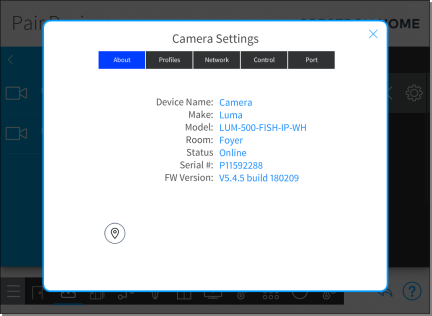
Tap the gear button  next to the device name to display a Settings dialog box for the camera. The About tab is selected and displays the device information. The Settings dialog box has additional tabs for Profiles, Network, Control, and Port.
Tap the location button and then the Preview button to view the camera's snapshot in your web browser. Use the snapshot to confirm the camera's location.
Configure the Camera
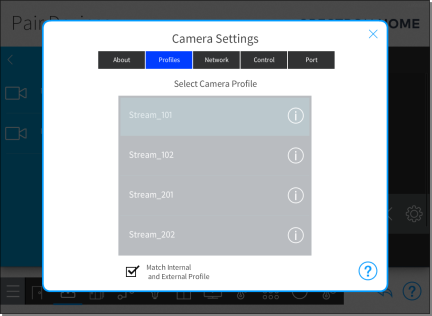
Tap the Profiles tab to configure the camera profiles. Select the camera profile that you would like to use for the camera.
NOTE: Each camera manufacturer provides different profiles for their cameras.
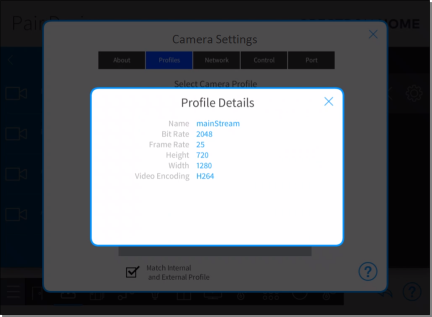
To view information about the camera profile, tap the information button next to the profile name.
Tap the Network tab to configure the camera network configuration.
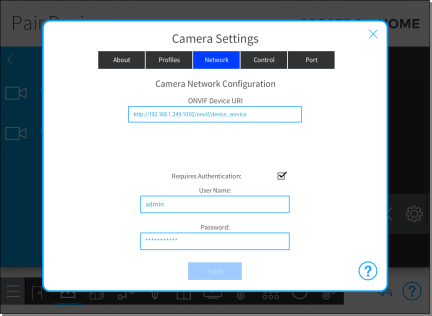
- ONVIF Device URI: Enter the ONVIF device URI that is provided from the camera. (Note: For Hikvision camera, it is http://IP:Port/onvif/device_service)
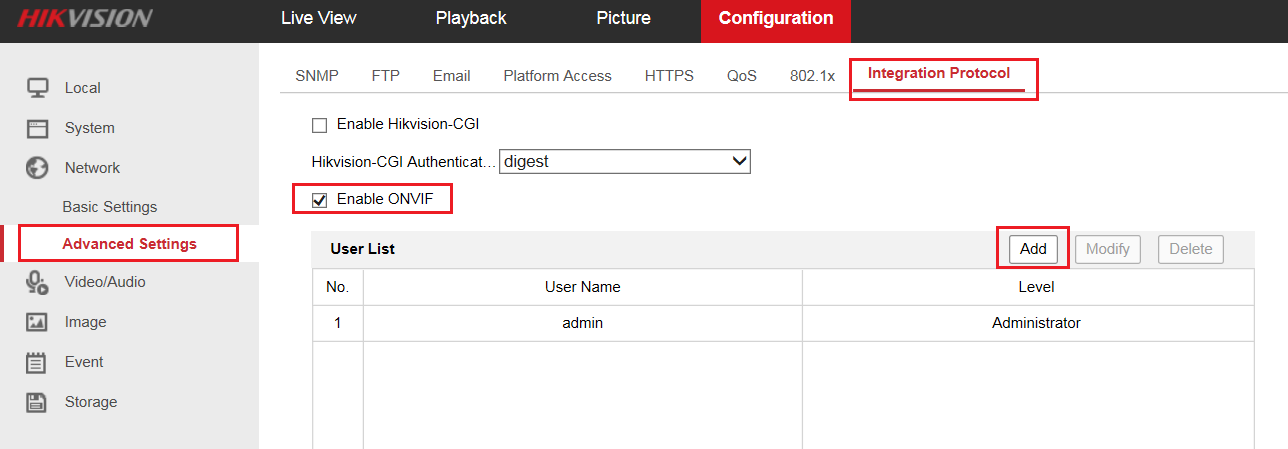
- Requires Authentication: If the ONVIF camera requires authentication, select the check box next to Requires Authentication and then enter the username and password for the ONVIF camera. (For Hikvision camera, the ONVIF is disabled by default. Customer will need to enable it and create an ONVIF user account through camera web interface.)
- Go to Camera web GUI >> Configuration >> Network >> Advanced Settings >> Integration Protocol.
- Enable ONVIF.
- Click “Add” button to input username and password, which Media user, operator and administrator are selectable. The maximum number of users is up to 32.
Note: ONVIF user management system is independent from device management system.
Tap the Control tab to configure the camera display in the Crestron Home user interface.
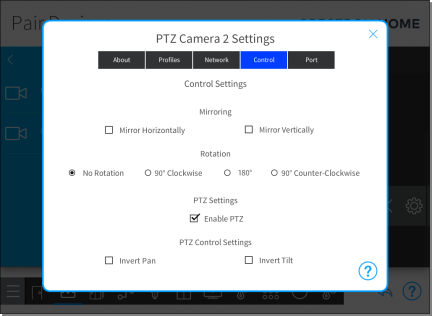
Mirroring:
- Mirror Horizontally: Select to mirror the camera display horizontally.
- Mirror Vertically: Select to mirror the camera display vertically.
Rotation:
- No Rotation: Select to keep the camera display at its default orientation.
- 90° Clockwise: Select to rotate the camera display 90 degrees clockwise.
- 180°: Select to rotate the camera display 180 degrees.
- 90° Counter-Clockwise: Select to rotate the camera display 90 degrees counterclockwise.
PTZ Settings:
NOTE: The PTZ controls are displayed only for cameras that support PTZ.
- Invert Pan: Select to invert the pan controls.
- Invert Tilt: Select to invert the tilt controls.
Tap the Port tab to configure camera port settings.
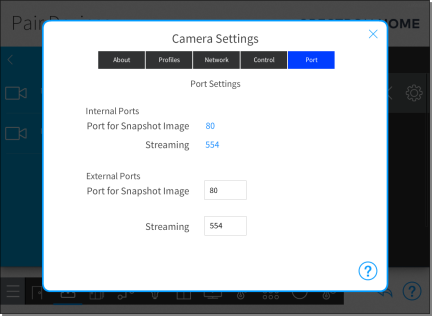
Port settings are available for Internal Ports and External Ports. The Port for Snapshot Image and Streaming are populated when the camera is added to the system. These fields generally do not need to be changed.
NOTES:
- The external ports are used to view the camera outside of the home.
- A myCrestron.com DNS registration is required to view the camera outside of the home. For details, refer to Enable Remote System Access
- Port for Snapshot Image: The port that is used by the camera for snapshot images. Snapshot images are used for static images within the Crestron Home user interface.
- Streaming: The port number that is used by the camera for the Real-Time Streaming Protocol (RTSP). This port allows the camera's DVR to display video within the Crestron Home user interface.
Reference & Notes:
- Camera set up manual also can be located on Crestron Website: https://docs.crestron.com/en-us/8525/Content/CP4R/Appendix/Works-With-Crestron-Home/Cameras.htm
- Audio and PTZ function on Hikvision cameras currently not supported, we will update the team when it’s added.